

|
||
|
|
||
|
||
|
Here's your monthly fraud newsletter! Read this edition on a new World Cup related scam, phone number spoofing and making the most ofpasskeys! |
||
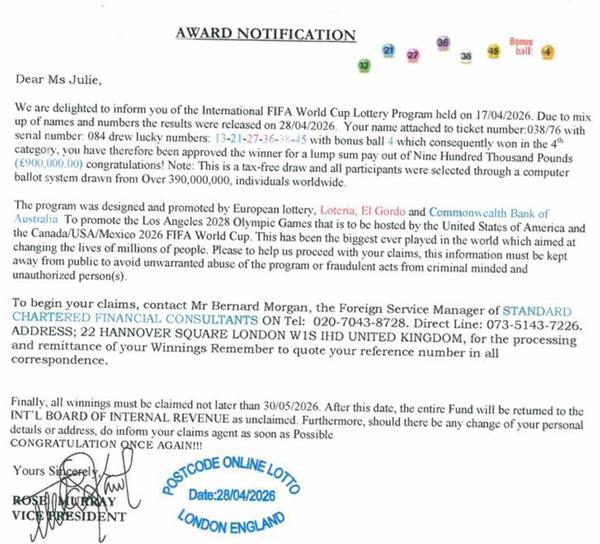
FIFA World Cup Lottery ScamSussex Police have been made aware of reports from residents receiving letters claiming they have won a FIFA World Cup Lottery. These are fraudulent scams. Do not respond to any communication (letter, phone call, text, or message) about a FIFA World Cup Lottery or similar schemes. Two separate cases in East Sussex and West Sussex involved individuals receiving a letter claiming that they had won £900,000 in the “International FIFA World Cup Lottery”. Marked as sent from Switzerland, the letter included a contact name, along with a London address and a telephone number to call for the prized to be claimed. In one case, a follow up letter was received, explaining that a small clearance fee of 0.01% would be required before the cheque could be released, along with a photocopy of the said cheque. This detail was reaffirmed when the victim phoned the number provided, then being told they would call back with instructions on how to make the payment. Fortunately, both individuals became aware that this is a scam tactic and escaped from being defrauded.
Warning Signs of the Scam: You are told you have won a lottery you never entered Requests for fees or bank details to release a “prize” Pressure to act quickly or keep the win confidential References to locations such as Switzerland or London that are fake or misused Letters are highly personalised (your name printed throughout, fake certificates/cheques) Use of official-looking logos, seals, and financial-style language Claims of “guaranteed” or “100% genuine” winnings with exact amounts Signed by supposed officials with senior titles What to do? Ignore and do not engage Do not share personal or financial information For genuine FIFA-related products or promotions, only use official sources - FIFA | The Home of Football
Example of scam letter:
Phone number Spoofing‘Spoofing’ software is being increasingly used by criminals to conceal their real caller ID, mirroring the phone number of a legitimate organisation instead. This calls or text messages appear as though they are coming from a trusted organisation like the police, banks or government agencies. These scam calls may be automated, or from a real person. Their main goal is to trick you into sharing personal information or to transfer money. In Surrey Police and Sussex Police, we have seen multiple examples of where this tactic has been used in phone call and text format. In one of several similar examples, an elderly victim in Woking was targeted by fraudulent text messages appearing to come from Lloyds bank. In total, the victim lost £17,000 to fraudsters. Reports of this nature have been received across both counties, with victims receiving phone calls from bank impersonators, Police and other Government Officials.
Join the upgrade to passkeys!Enabling them saves you massive amounts of time and also makes your accounts more secure! Passkeys remove the need to remember passwords when logging and can massively reduce the risk of criminals guessing or stealing your password. How can something be both safer and easier? Well, passkeys are a like a digital house key. When you open your front door, you don’t start shouting words at it do you? You use a key. That’s how passkeys work but you have the added benefit of not needing to carry around a key, it’s always in your device or computer. You don’t need to remember it and criminals can’t steal it, keeping all your photos, emails and important documents safe from being lost! Passkeys give you 3 major benefits No more passwords to remember (or forget) Protection from data breaches, passkeys never leave your device and can’t be stolen! Faster sign in. Log into accounts in seconds
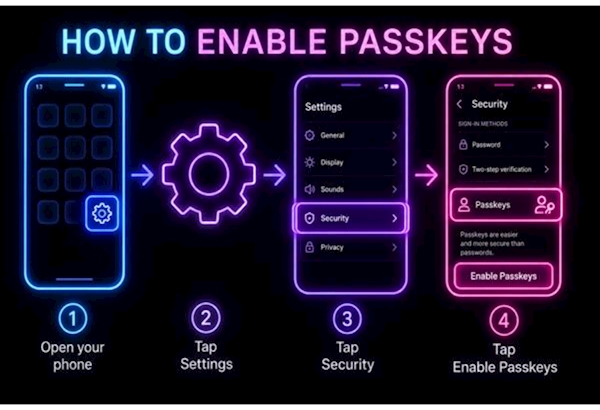
ACTION REQUIRED: 5 minutes of your time to eliminate the need for passwordsSetting up passkeys takes seconds. Set a plan for this evening, choose just ONE important account (Google, Microsoft, Amazon or Facebook) and enable passkeys. They can usually be found in Settings (cog wheel icon) > Security/Account/Privacy > Passkeys.
| ||
Reply to this message | ||
|


|
